
See what Visit.Works does
Everything here ships today, shown on the real product. Optimized routes, a schedule that keeps itself, a week that re-plans after a rain day, every customer on a map, the crew's day on their phone, and the office work around it all.
Plan and schedule the work
Route planning is usually a black box. Ours shows its work, and it keeps the whole schedule running day after day.
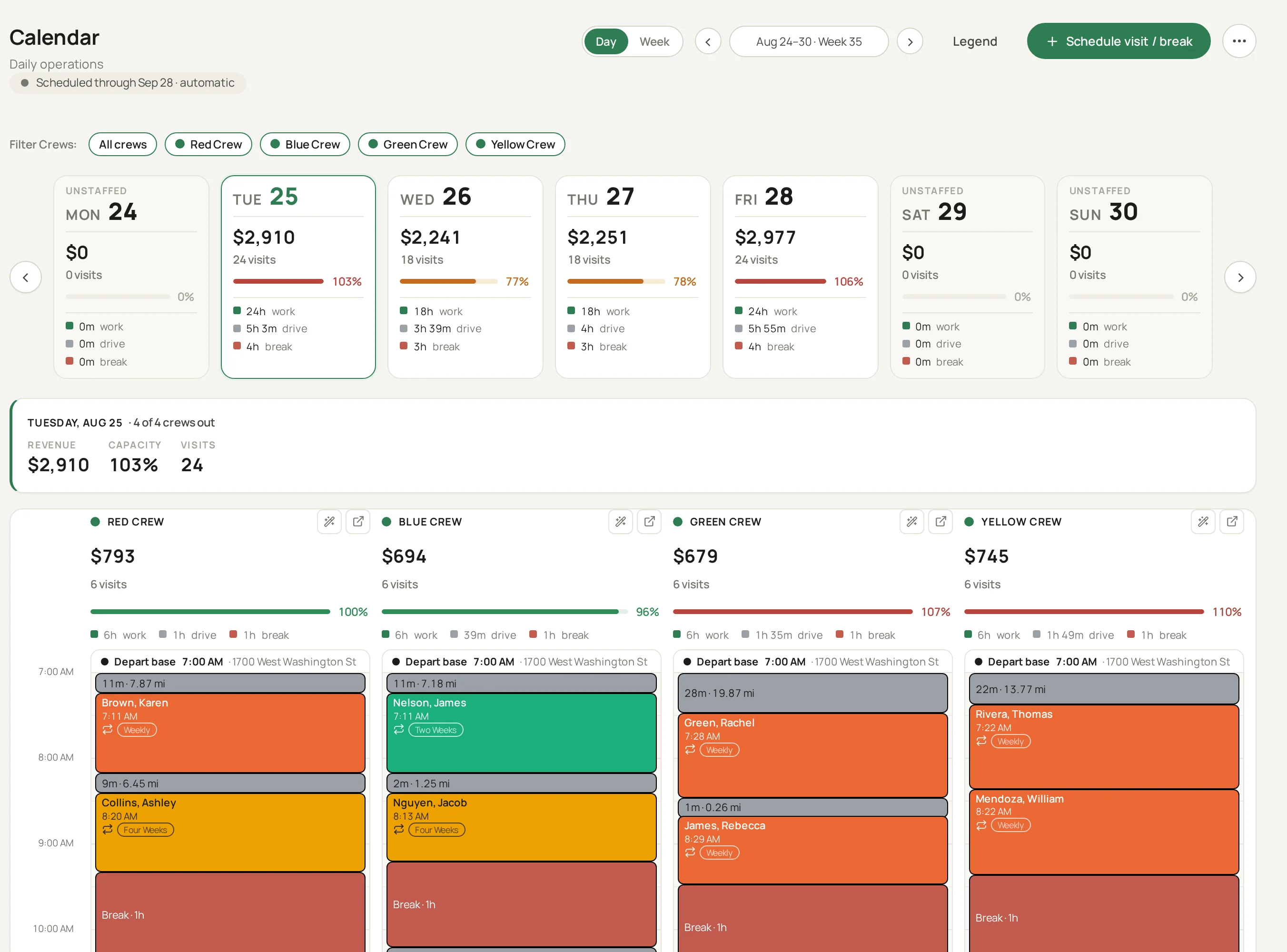
Optimized routes on real roads
Each crew's day is sequenced to keep driving down, using true road distances rather than straight lines. Every leg shows its distance and drive time, so the plan matches what the truck will really do.
Set the schedule once, and it stays full
Pick each customer's pattern and a start date, weekly, every two weeks, or every four weeks, and every future visit lines up on its own. The calendar keeps filling itself forward, so you're never rebuilding next month by hand.
More than one service per customer
Weekly mowing and a one-time aeration at the same address. Each service keeps its own cadence and its own place on the route, and both show on the customer's record.
Built around how you run the business
One dial sets how much of each day goes to the standing route and how much stays open for short-notice work. Pack for capacity, or leave breathing room, and the plan respects your call every time it fills the calendar.
Depots, trucks and days off
Each crew starts and ends its day at its own depot, with its truck on file. Mark a crew off for a day or a week and nothing new lands on it. The visits already there are listed with a best fit for each, so you can move, make up or skip them in one go.
Holidays and closed days
Mark a holiday as closed and nothing is booked on it. You choose whether the visits already on that day are cancelled.
Nothing moves without telling you
Set a customer's must-have crew, day, or time, and it holds. If something can't work, you get an alert, not a surprise. No visit ever gets shuffled behind your back.
Nothing falls through the cracks
Miss a visit for any reason and we raise it as an issue on your list. From there it's your call: schedule a make-up, move it, or let it go. Nothing gets decided behind your back, and nothing gets forgotten.
Works the way your team works
Everybody's crew is different. See the schedule on the web, pull it up on a phone, or print it for the truck. However your team likes to work, the plan meets them there.
Easily reschedule visits
In the most optimal way
A customer can't make their day? Press Reschedule visit and see the five places that week that add the least driving, each with its crew, arrival time, how full the day gets and how close it lands to their next visit. Pick one and it's moved, with Undo if you change your mind.
When the day falls apart
Rain, a sick crew or a broken truck takes a day away. Report it once and get the week back.
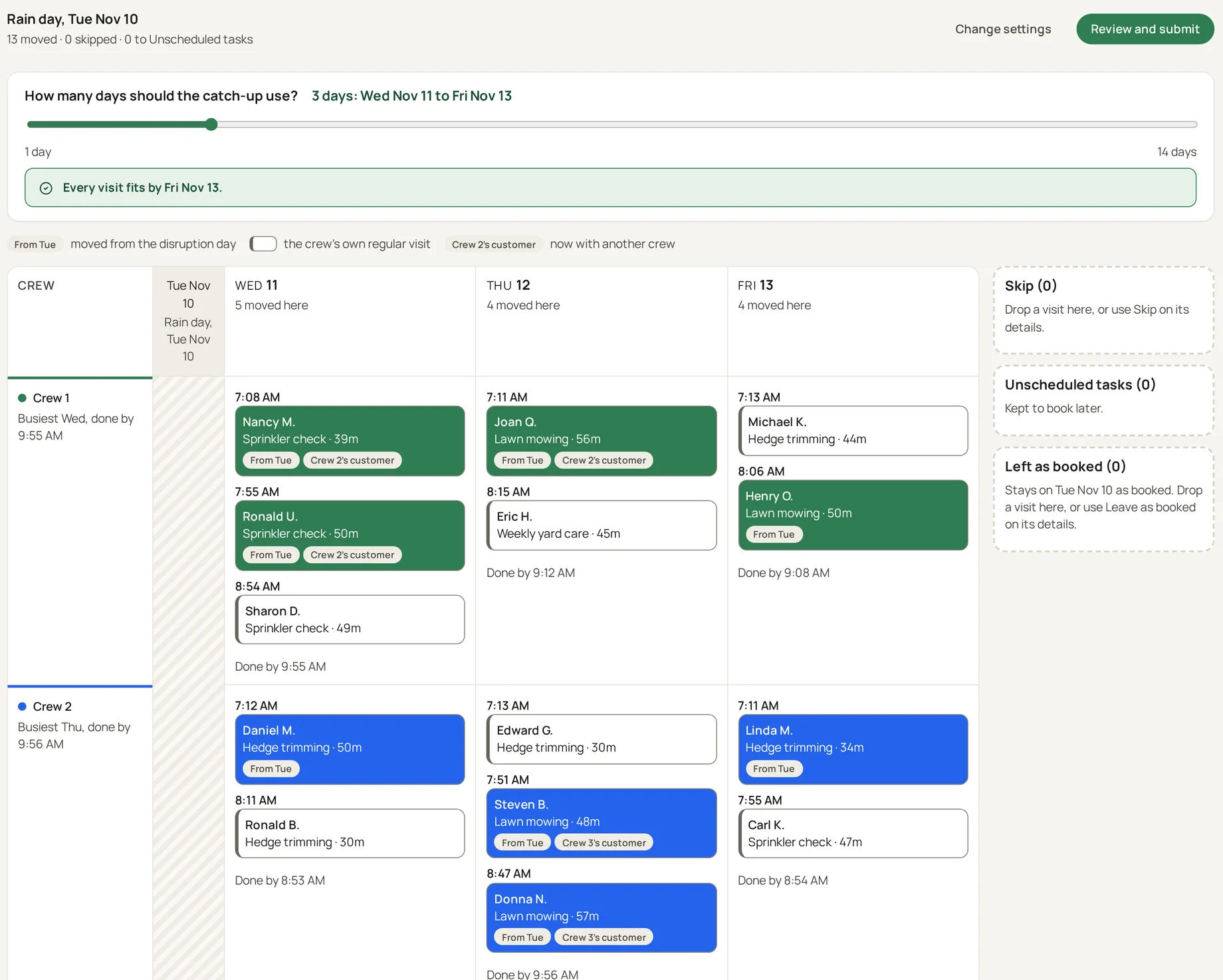
Report it once
Say what happened, which crews it hits and which days, from the calendar. One report covers a rain day, a crew out for a week or a truck in the shop.
Skip the visits, or fit them back in
Skip them all, or fit them into the schedule. Choose how many days the catch-up may use, whether other crews help and whether days may run longer, and see the day you are caught up by.
Check the new week before anything changes
The re-planned week shows every moved visit. Drag one where you want it, or use Move to. Nothing is saved until you submit.
Change it or undo it
If the weather turns, extend it, shorten it or undo it, and the visits it moved go back.
See it on the map
Every customer, and every opening for a new one, on a real street map.
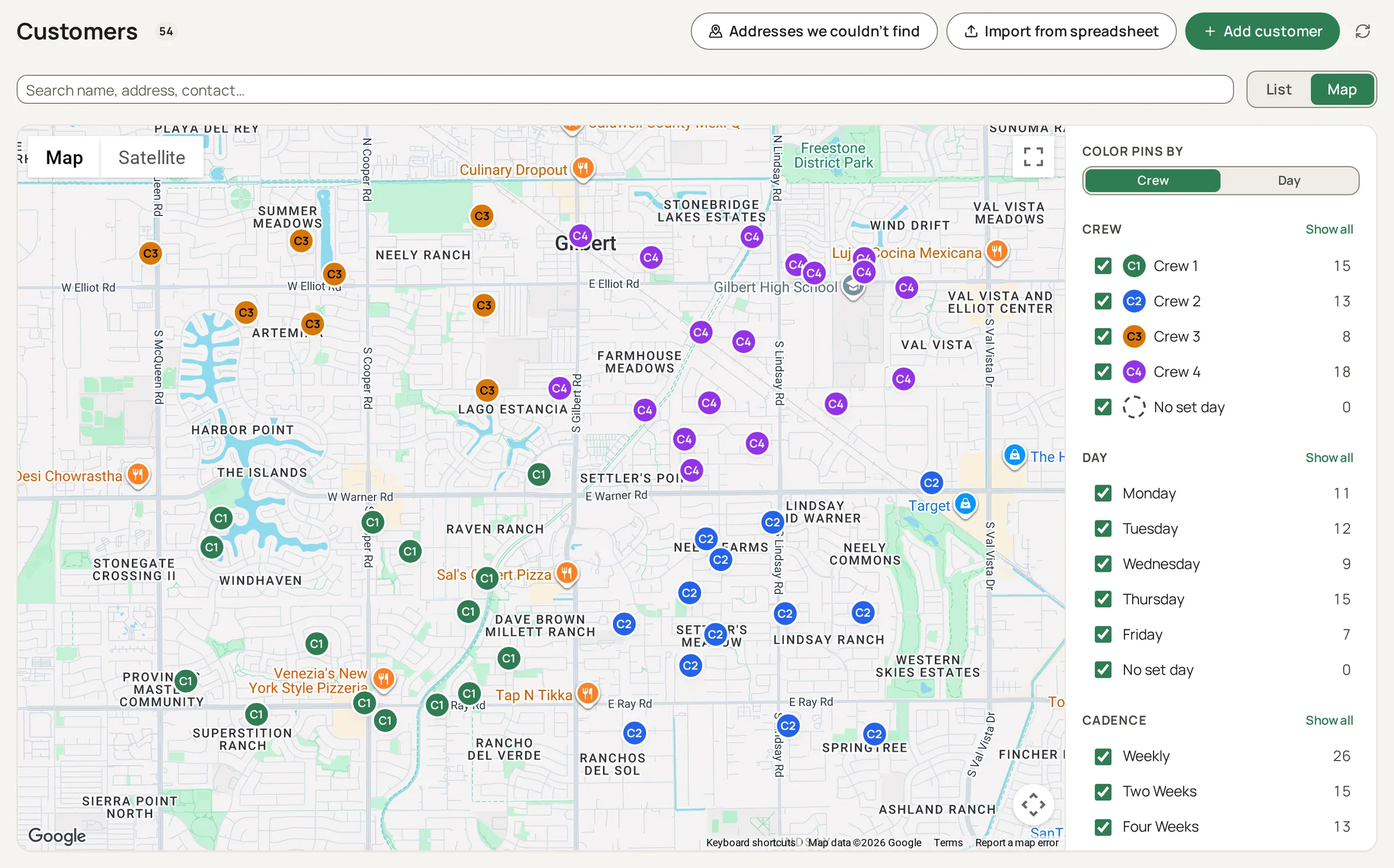
Every customer on a map
Switch the Customers screen to Map and every customer is a pin, colored by crew or by day. Filter by crew, day, cadence and status, and open a pin for the next visit, directions and the customer's record. Turn on prospects to see where your leads are.
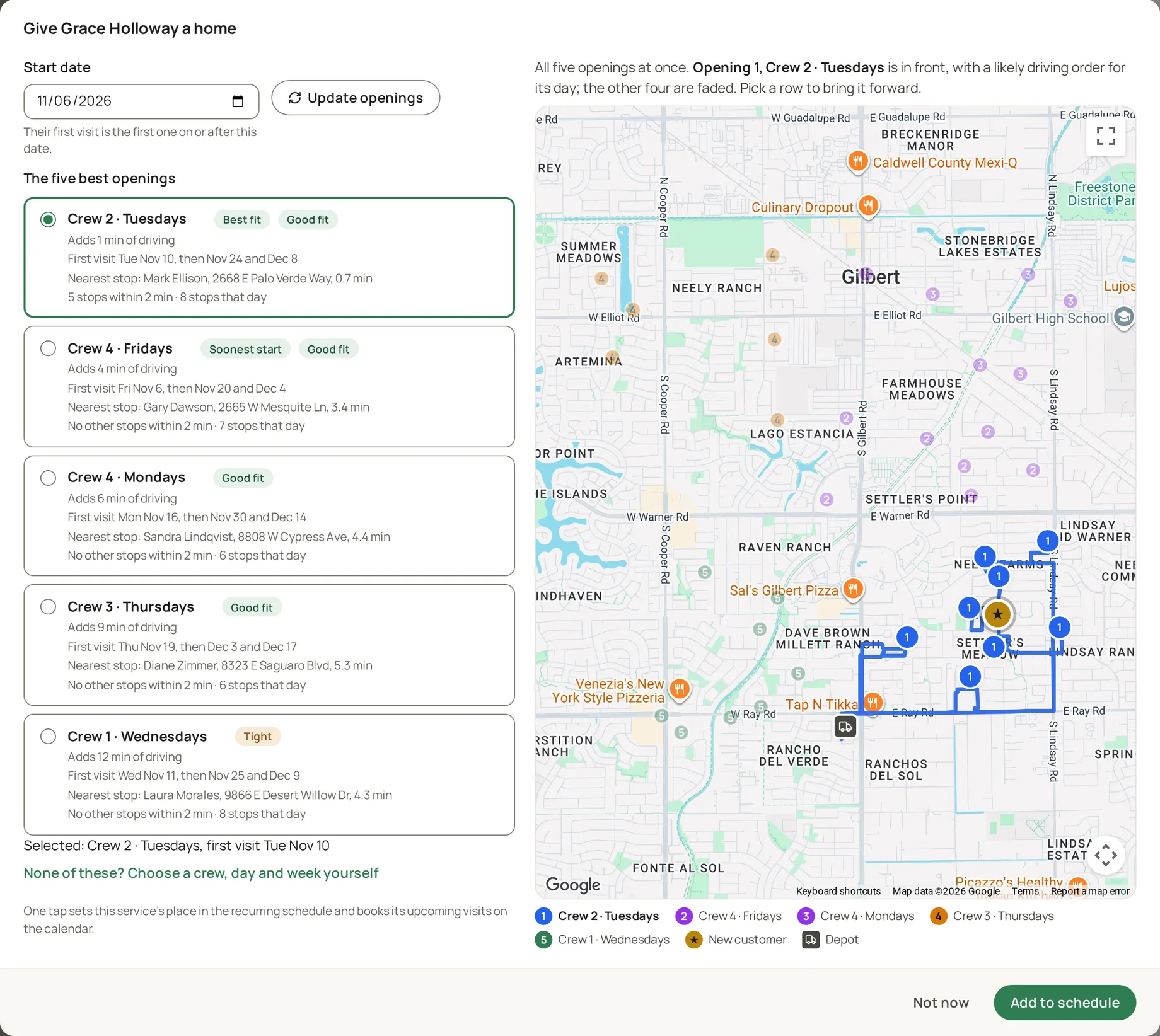
See where a new customer fits
Add a customer and Visit.Works offers the five best openings, best first: the crew, the day, the week and the driving each one adds. A map beside the list shows all five, with a likely driving order for the one you pick and the new customer on it.
The crew's day, on their phone
The best plan dies at the depot if the crew can't see it. Theirs rides along, in the browser they already have.
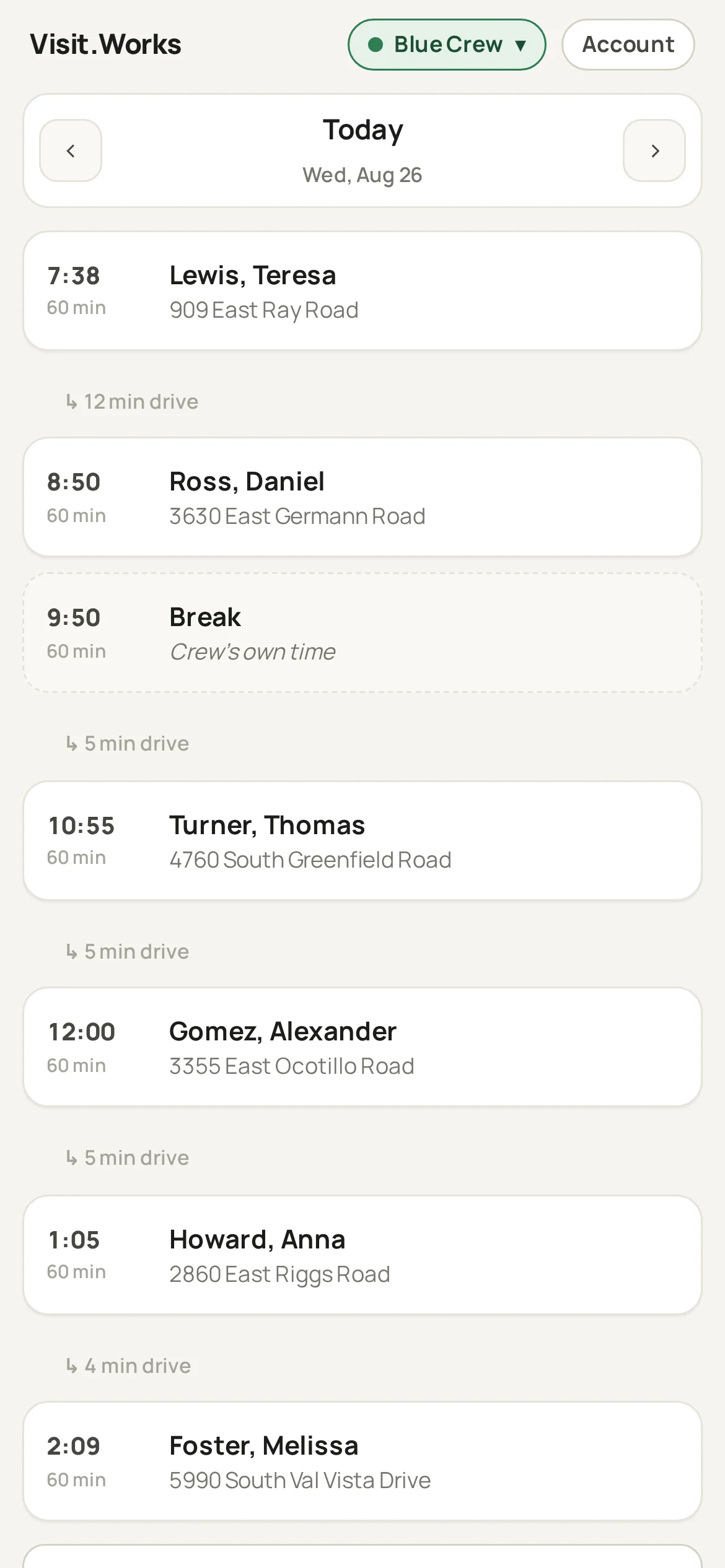
The whole day, easy to read
Every stop laid out in order, top to bottom. Each one shows the address, the drive to get there, how long the visit should take, and any notes for that stop. Your crew just follows the list, no guessing, no calling the office.
Close out each stop on the spot
When a job's done, the crew taps done and moves on. If something got in the way, a locked gate, a dog in the yard, they log what happened and what needs a follow-up. The office sees it right away.
Your own checklists on every visit
Build the tasks and readings your business needs, like "Skimmed the pool" or "Chlorine, ppm", and bundle them into a profile for each kind of service. A task can come up every visit or every few weeks. The crew records them on the phone, a reading outside its normal range is raised on the Issues page, and every answer stays on the customer's history.
Proof of work, right on the visit
Crews can snap photos at the stop and they attach straight to that visit. Before-and-after shots, a finished job, a problem they spotted. It's all saved on the record, not buried in someone's camera roll or a group text.
The day keeps up, nothing to install
If the office re-plans while the crew is out, the phone says so. It runs in the phone's browser: no app store, no updates to chase.
Bring on customers, win new work
Switch over without losing a thing, then turn every curbside conversation into an estimate.
Bring your customers with you
Import your existing customer list, addresses and schedules included, with a wizard that shows you what it found before anything is saved.
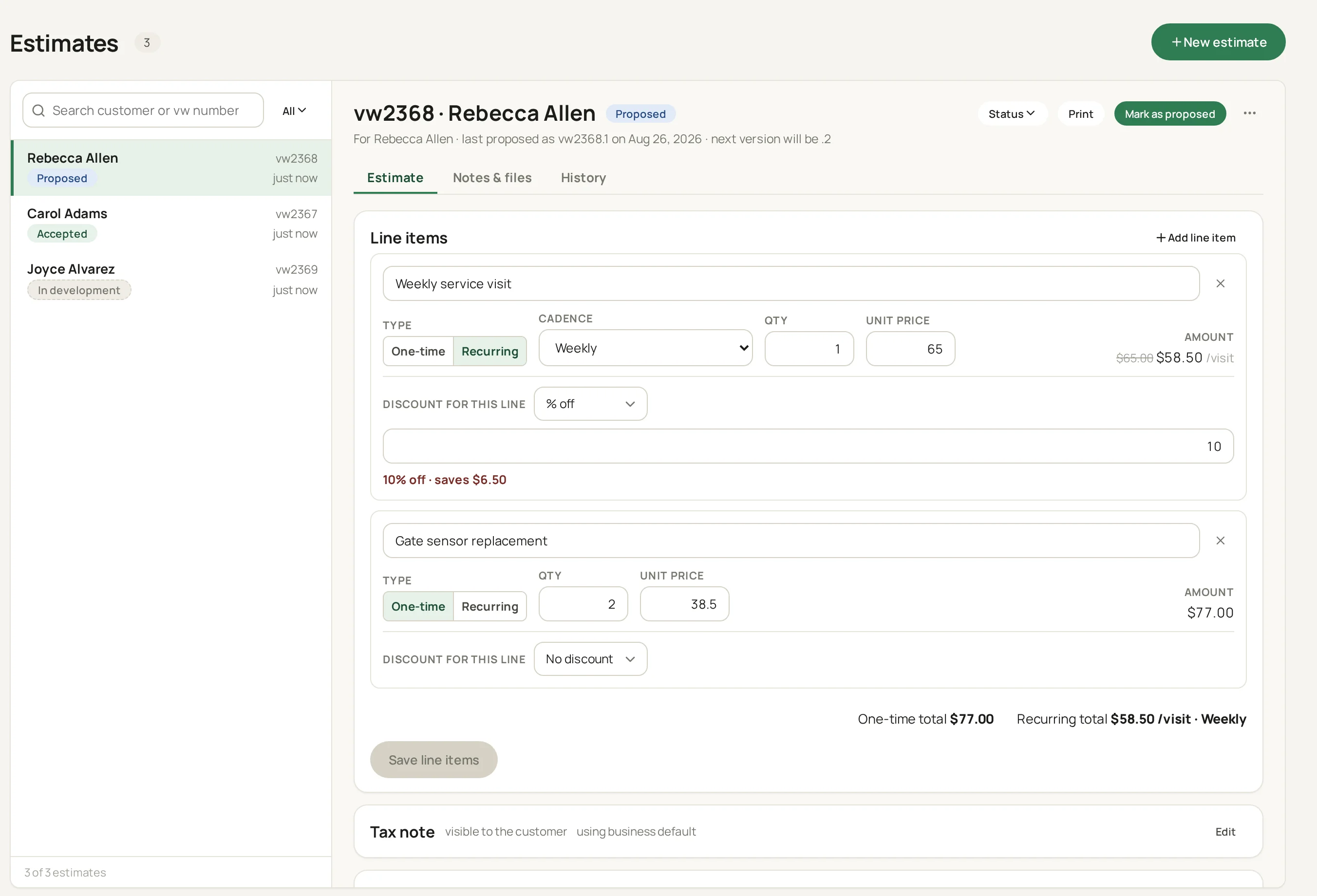
Turn a curbside chat into an estimate
A crew can start an estimate from the curb, notes and all, and the office prices it and hands the customer a clean copy or PDF with your logo on it. Track every prospect and see what closed, so no lead slips away.
Keep an eye on the business
See how the business is running, and decide who gets to see what.
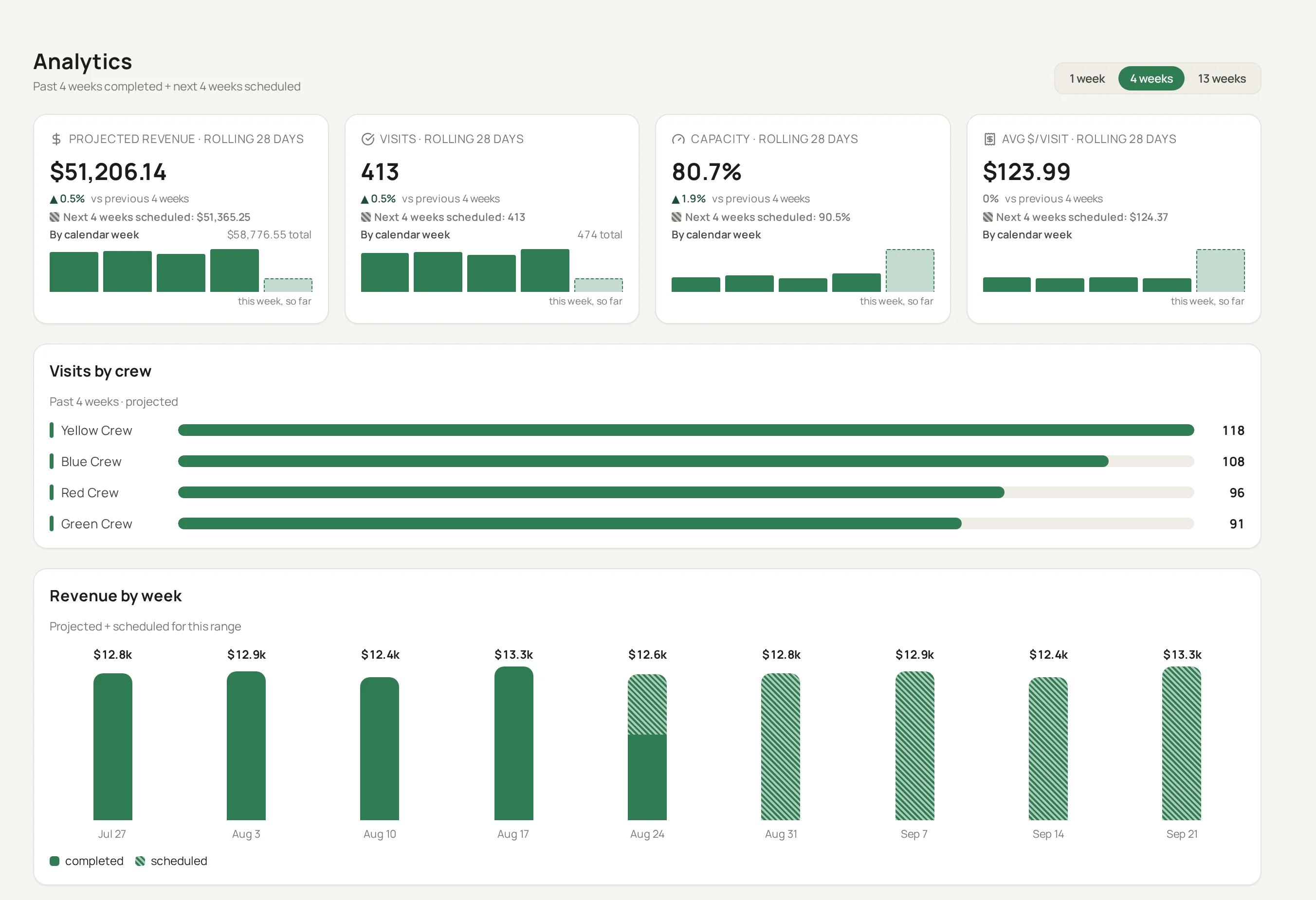
Analytics on every plan
The dashboard comes with every plan. Track your revenue, visits completed, how full your crews' days run, and how much of the day goes to driving, over the last week, month, or quarter, with the numbers broken out per crew.
Roles that fit your office
Build your own roles and permissions, so everyone sees exactly what they should. Two-factor authentication is available on every plan.
Every change, in plain words
History lists every change made in the business, who made it and when, in plain words. Open it for the whole business or for one customer, so “who moved this visit?” always has an answer.
Help when you need it
Guides for every screen
Help is built into the app, with step-by-step guides for each part of it that you can search in your own words.
Ask the help assistant
Ask a question in your own words and get an answer drawn from those guides, with the guide it came from beside it.
A person when you need one
Chat with us live when we are online, or send a support request and follow it in the app. Included on every plan.
Coming soon
QuickBooks export
Send your estimate and financial data across to QuickBooks. Included on every plan.
Try it on your own routes
$10 a month for your first three months, paid from the start, then your plan's regular price. Cancel any time.
Get started